Cacti 설치
cacti는 RRDTool의 데이터베이스를 이용하여 웹에서 시스템 상황을 데이터값으로 저장하고 시간이 흐른 뒤
저장된 데이터를 분석하여 웹상으로 보여주는 모니터링 시스템이다.
cacti는 php를 기반으로 하므로 php가 설치되어 있어야하며, CentOS 설치부터 따라하셨다면 설치가 될 것이다.
STEP 1.
Cacti 다운 받는다.
[root@Cacti download]# pwd
/download
[root@Cacti download]# lftpget http://www.cacti.net/downloads/cacti-0.8.7c.tar.gz
다운 받은 Cacti 파일을 압축을 푼다.
[root@Cacti download]# tar xvfz cacti-0.8.7c.tar.gz
..... 생략 ......
cacti-0.8.7c/include/jscalendar/lang/calendar-no.js
cacti-0.8.7c/include/jscalendar/lang/calendar-de.js
cacti-0.8.7c/include/jscalendar/lang/calendar-cs-utf8.js
cacti-0.8.7c/include/jscalendar/lang/calendar-big5-utf8.js
cacti-0.8.7c/include/jscalendar/lang/calendar-zh.js
cacti-0.8.7c/include/jscalendar/lang/calendar-en.js
cacti-0.8.7c/include/jscalendar/lang/calendar-hr-utf8.js
cacti-0.8.7c/include/jscalendar/lang/calendar-sp.js
cacti-0.8.7c/include/jscalendar/lang/calendar-ko-utf8.js
cacti-0.8.7c/include/jscalendar/lang/calendar-hu.js
cacti-0.8.7c/include/jscalendar/lang/calendar-hr.js
cacti-0.8.7c/include/jscalendar/lang/calendar-pl.js
cacti-0.8.7c/include/jscalendar/lang/calendar-jp.js
cacti-0.8.7c/include/jscalendar/lang/calendar-cs-win.js
cacti-0.8.7c/include/jscalendar/lang/calendar-lt-utf8.js
cacti-0.8.7c/include/jscalendar/lang/calendar-el.js
cacti-0.8.7c/include/jscalendar/lang/calendar-sv.js
cacti-0.8.7c/include/jscalendar/lang/calendar-ko.js
cacti-0.8.7c/include/jscalendar/lang/calendar-bg.js
cacti-0.8.7c/include/jscalendar/lang/calendar-he-utf8.js
cacti-0.8.7c/include/jscalendar/lang/calendar-sk.js
cacti-0.8.7c/include/jscalendar/lang/calendar-al.js
cacti-0.8.7c/include/jscalendar/lang/calendar-da.js
cacti-0.8.7c/include/jscalendar/lang/calendar-ro.js
cacti-0.8.7c/include/config.php
cacti-0.8.7c/include/main.css
cacti-0.8.7c/include/global_settings.php
cacti-0.8.7c/include/layout.js
cacti-0.8.7c/include/global_constants.php
cacti-0.8.7c/include/zoom.js
cacti-0.8.7c/include/global_arrays.php
cacti-0.8.7c/include/top_header.php
cacti-0.8.7c/include/bottom_footer.php
cacti-0.8.7c/include/global.php
cacti-0.8.7c/rra/
cacti-0.8.7c/rra/.placeholder
cacti-0.8.7c/graphs_new.php
cacti-0.8.7c/scripts/
cacti-0.8.7c/scripts/ss_sql.php
cacti-0.8.7c/scripts/query_host_cpu.php
cacti-0.8.7c/scripts/ping.pl
cacti-0.8.7c/scripts/loadavg.pl
cacti-0.8.7c/scripts/loadavg_multi.pl
cacti-0.8.7c/scripts/unix_users.pl
cacti-0.8.7c/scripts/unix_processes.pl
cacti-0.8.7c/scripts/weatherbug.pl
cacti-0.8.7c/scripts/query_host_partitions.php
cacti-0.8.7c/scripts/sql.php
cacti-0.8.7c/scripts/diskfree.sh
cacti-0.8.7c/scripts/diskfree.pl
cacti-0.8.7c/scripts/linux_memory.pl
cacti-0.8.7c/scripts/unix_tcp_connections.pl
cacti-0.8.7c/scripts/webhits.pl
cacti-0.8.7c/scripts/ss_host_disk.php
cacti-0.8.7c/scripts/ss_host_cpu.php
cacti-0.8.7c/scripts/query_unix_partitions.pl
cacti-0.8.7c/scripts/3com_cable_modem.pl
cacti-0.8.7c/scripts/ss_fping.php
cacti-0.8.7c/auth_login.php
cacti-0.8.7c/cdef.php
cacti-0.8.7c/poller_export.php
[root@Cacti download]#
[root@Cacti download]# cd cacti-0.8.7c
[root@Cacti cacti-0.8.7c]# ls
about.php color.php graph_image.php graph_templates_items.php include poller_commands.php scripts user_admin.php
auth_changepassword.php data_input.php graph.php graph_templates.php index.php poller_export.php script_server.php utilities.php
auth_login.php data_queries.php graph_settings.php graph_view.php install poller.php script_server.pl
cacti.sql data_sources.php graphs_items.php graph_xport.php lib README settings.php
cdef.php data_templates.php graphs_new.php host.php LICENSE resource templates_export.php
cli docs graphs.php host_templates.php log rra templates_import.php
cmd.php gprint_presets.php graph_templates_inputs.php images logout.php rra.php tree.php
[root@Cacti cacti-0.8.7c]#
STEP 2.
Cacti 데이터 파일을 저장하기 위해 mysql에 데이터베이스를 생성한다.
[root@Cacti cacti-0.8.7c]# mysqladmin create cacti -u root -p
Enter password:
[root@Cacti cacti-0.8.7c]#
Cacti 데이터베이스에 필요한 테이블과 기본 데이터 생성하기
[root@Cacti cacti-0.8.7c]# mysql cacti < cacti.sql -u root -p
Enter password:
[root@Cacti cacti-0.8.7c]#
Cacti 데이터베이스 접근권한을 설정한다.
[root@Cacti cacti-0.8.7c]# mysql mysql -u root -p
Enter password:
Welcome to the MySQL monitor. Commands end with ; or \g.
Your MySQL connection id is 6
Server version: 5.0.75-log Source distribution
Type 'help;' or '\h' for help. Type '\c' to clear the buffer.
mysql> GRANT ALL ON cacti.* TO cactiuser@localhost IDENTIFIED BY '여기에 패스워드를 입력';
Query OK, 0 rows affected (0.05 sec)
mysql> flush privileges;
Query OK, 0 rows affected (0.00 sec)
mysql>
mysql 권한 설정 후 권한 재설정 사항을 적용하기 위해서 flush privilesges; 명령어를 수행한 것이다.
위의 기본제공되는 cacti.sql 파일을 mysql에 저장하였다. 저장된 mysql 데이터 베이스를 아래와 같이 확인 해 본다.
mysql> show databases;
+--------------------+
| Database |
+--------------------+
| information_schema |
| cacti |
| mysql |
| test |
+--------------------+
4 rows in set (0.01 sec)
mysql>
mysql> use cacti
Database changed
mysql> show tables;
+---------------------------+
| Tables_in_cacti |
+---------------------------+
| cdef |
| cdef_items |
| colors |
| data_input |
| data_input_data |
| data_input_fields |
| data_local |
| data_template |
| data_template_data |
| data_template_data_rra |
| data_template_rrd |
| graph_local |
| graph_template_input |
| graph_template_input_defs |
| graph_templates |
| graph_templates_gprint |
| graph_templates_graph |
| graph_templates_item |
| graph_tree |
| graph_tree_items |
| host |
| host_graph |
| host_snmp_cache |
| host_snmp_query |
| host_template |
| host_template_graph |
| host_template_snmp_query |
| poller |
| poller_command |
| poller_item |
| poller_output |
| poller_reindex |
| poller_time |
| rra |
| rra_cf |
| settings |
| settings_graphs |
| settings_tree |
| snmp_query |
| snmp_query_graph |
| snmp_query_graph_rrd |
| snmp_query_graph_rrd_sv |
| snmp_query_graph_sv |
| user_auth |
| user_auth_perms |
| user_auth_realm |
| user_log |
| version |
+---------------------------+
48 rows in set (0.00 sec)
mysql> quit
Bye
[root@Cacti cacti-0.8.7c]#
STEP 3.
기본 데이터 베이스를 확인한 다음 Cacti의 접속 환경설정 php 파일을 수정한다.
[root@Cacti cacti-0.8.7c]# vi include/config.php
<?php
/*
+-------------------------------------------------------------------------+
| Copyright (C) 2004-2008 The Cacti Group |
| |
| This program is free software; you can redistribute it and/or |
| modify it under the terms of the GNU General Public License |
| as published by the Free Software Foundation; either version 2 |
| of the License, or (at your option) any later version. |
| |
| This program is distributed in the hope that it will be useful, |
| but WITHOUT ANY WARRANTY; without even the implied warranty of |
| MERCHANTABILITY or FITNESS FOR A PARTICULAR PURPOSE. See the |
| GNU General Public License for more details. |
+-------------------------------------------------------------------------+
| Cacti: The Complete RRDTool-based Graphing Solution |
+-------------------------------------------------------------------------+
| This code is designed, written, and maintained by the Cacti Group. See |
| about.php and/or the AUTHORS file for specific developer information. |
+-------------------------------------------------------------------------+
| http://www.cacti.net/ |
+-------------------------------------------------------------------------+
*/
/* make sure these values refect your actual database/host/user/password */
$database_type = "mysql";
$database_default = "cacti";
$database_hostname = "localhost";
$database_username = "cactiuser";
$database_password = "cactiuser";
$database_port = "3306";
/* Default session name - Session name must contain alpha characters */
#$cacti_session_name = "Cacti";
?>
아래와 같이 수정했다.
<?php
/*
+-------------------------------------------------------------------------+
| Copyright (C) 2004-2008 The Cacti Group |
| |
| This program is free software; you can redistribute it and/or |
| modify it under the terms of the GNU General Public License |
| as published by the Free Software Foundation; either version 2 |
| of the License, or (at your option) any later version. |
| |
| This program is distributed in the hope that it will be useful, |
| but WITHOUT ANY WARRANTY; without even the implied warranty of |
| MERCHANTABILITY or FITNESS FOR A PARTICULAR PURPOSE. See the |
| GNU General Public License for more details. |
+-------------------------------------------------------------------------+
| Cacti: The Complete RRDTool-based Graphing Solution |
+-------------------------------------------------------------------------+
| This code is designed, written, and maintained by the Cacti Group. See |
| about.php and/or the AUTHORS file for specific developer information. |
+-------------------------------------------------------------------------+
| http://www.cacti.net/ |
+-------------------------------------------------------------------------+
*/
/* make sure these values refect your actual database/host/user/password */
$database_type = "mysql";
$database_default = "cacti";
$database_hostname = "localhost";
$database_username = "cactiuser";
$database_password = "여기에 패스워드를 입력";
$database_port = "3306";
/* Default session name - Session name must contain alpha characters */
#$cacti_session_name = "Cacti";
?>
데이터파일과 로그파일이 저장될 디렉토리의 퍼미션을 변경한다.
[root@Cacti cacti-0.8.7c]# chmod 777 rra log
[root@Cacti cacti-0.8.7c]#
웹서버 디렉토리 안에 cacti 디렉토리를 심볼릭링크를 건다.
[root@Cacti cacti-0.8.7c]# ln -s /download/cacti-0.8.7c /usr/local/server/apache/htdocs/cacti
[root@Cacti cacti-0.8.7c]#
STEP 4.
RRDtool을 설치해야 한다. 필자가 써 놓은 RRDtool 설치를 보고 RRDtool을 먼저 설치한다.
STEP 5.
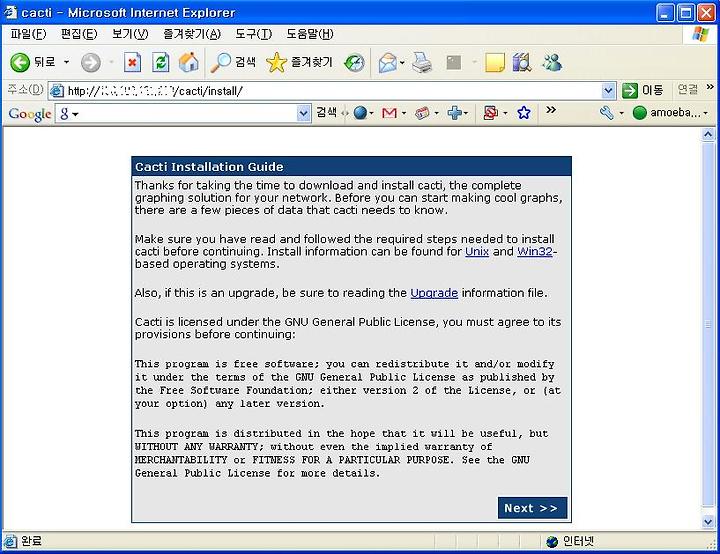
웹브라우저를 이용하여 cacti 링크를 걸어둔 URL로 접속 한다.